

Lots of research tools make you jump through hoops to get insights.
Our product team don’t build that way. An extremely positive user experience is key, every step of the way.
Now you can build surveys with support from AI, control shared dashboards, and apply filters across multiple views – all inside one platform and at no extra cost.
Here’s what’s new in this, our first product update for 2026.
Glow on.
 AI Survey Builder: Surveys at the Speed of Thought
Survey design takes time. Scripting takes longer. That’s why we’re super excited to show our AI builder to the world.
It’s a step change in how you can create surveys in Glow, significantly reducing the repetitive setup work, so you can focus on refining questions, improving structure, and sharpening insights.
Starting from scratch? Tell Glow’s AI your research objectives, and generate a structured draft in seconds. Then make tweaks using plain language.
Have an existing survey you want to use? Upload it in .Doc .DocX, or PDF format, and AI converts it into a ready-to-edit Glow survey.
No rebuilding. No copy-pasting. No starting from scratch.
How it works
- Write your objective: Generate a full survey from a simple set of objectives, i.e., tell it about:
- Audience – e.g. which country or any specific targeting.
- Topic – e.g. brand awareness, customer satisfaction, product feedback.
- Outcomes – e.g. what decisions will the results inform.
- Any specific sections or questions – e.g. demographics, satisfaction, importance, etc.
- Any specific limitations – e.g. length of survey, question types.
Then watch as it creates a draft survey that aligns to your prompts in seconds.
- Refine using natural language: Add, change or remove questions. Simply use phrases like “Make the tone neutral” or “Add a follow-up on price sensitivity”
- Upload an existing survey: And magically convert into Glow format and then adjust it as required either using the AI assistant and/or the usual manual editor
Ideal for
- Getting a strong first draft fast
- Migrating legacy surveys
- Scripting an existing questionnaire
- Help when you don’t know where to start
- Iterating during pitches or proposals
Note: We have updated our terms of use to include AI features – these can be found in section 5.9 of Glow’s Platform terms of use
AI Assistant
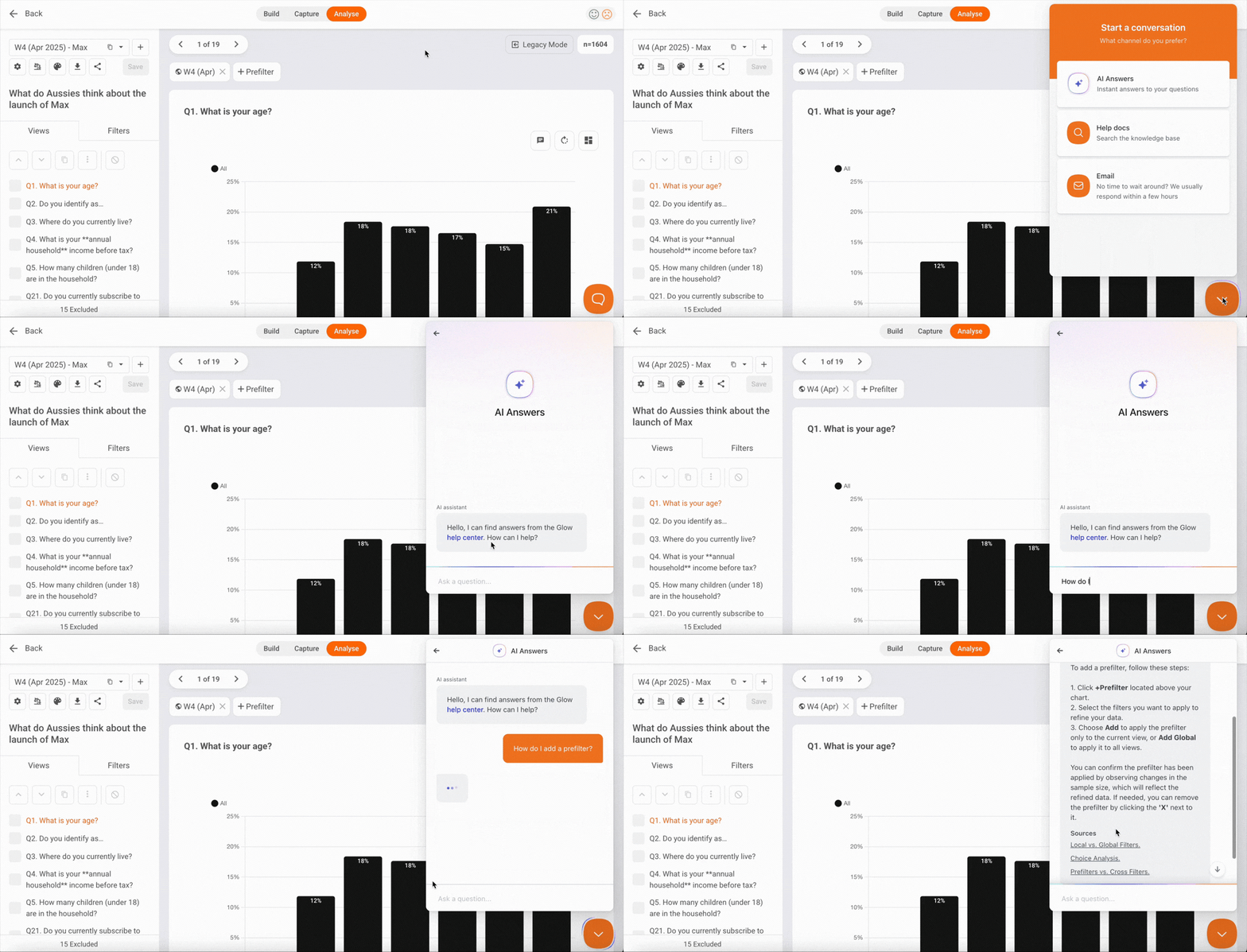
Getting support on Glow just got easier.
The Help button now supports AI-powered, natural-language search across all Help articles. Ask it like a human, and get the answers you need without leaving the platform.
Why it matters
- Less friction when you get stuck
- Fewer support tickets
- Guidance exactly when you need it
Faster answers = more momentum, fewer interruptions.
 Read-only shared dashboards
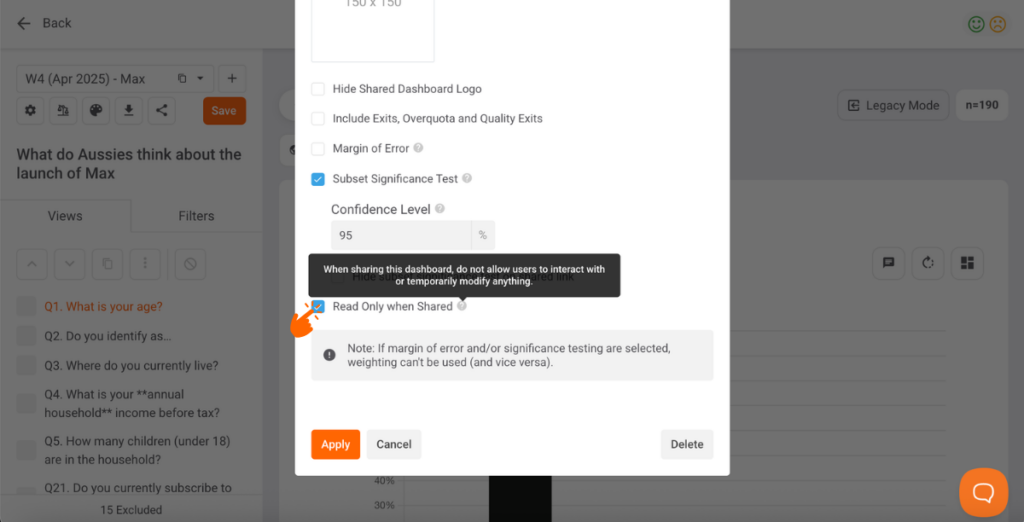
More control when sharing insights.
Shared dashboards used to be fully editable. Now, you can toggle “Read Only when Shared” in your dashboard settings.
When enabled, users can only switch between views. No filters. No table or chart changes. No custom analysis.
Why it matters
- Keeps executive or stakeholder dashboards clean
- Reduces risk of misinterpretation
- Better control over what users see
Bonus: also makes dashboard more mobile-friendly.
Don’t forget to click “Save” in the master dashboard to apply read only to the shared dashboard.
Add/remove local filters to multiple views
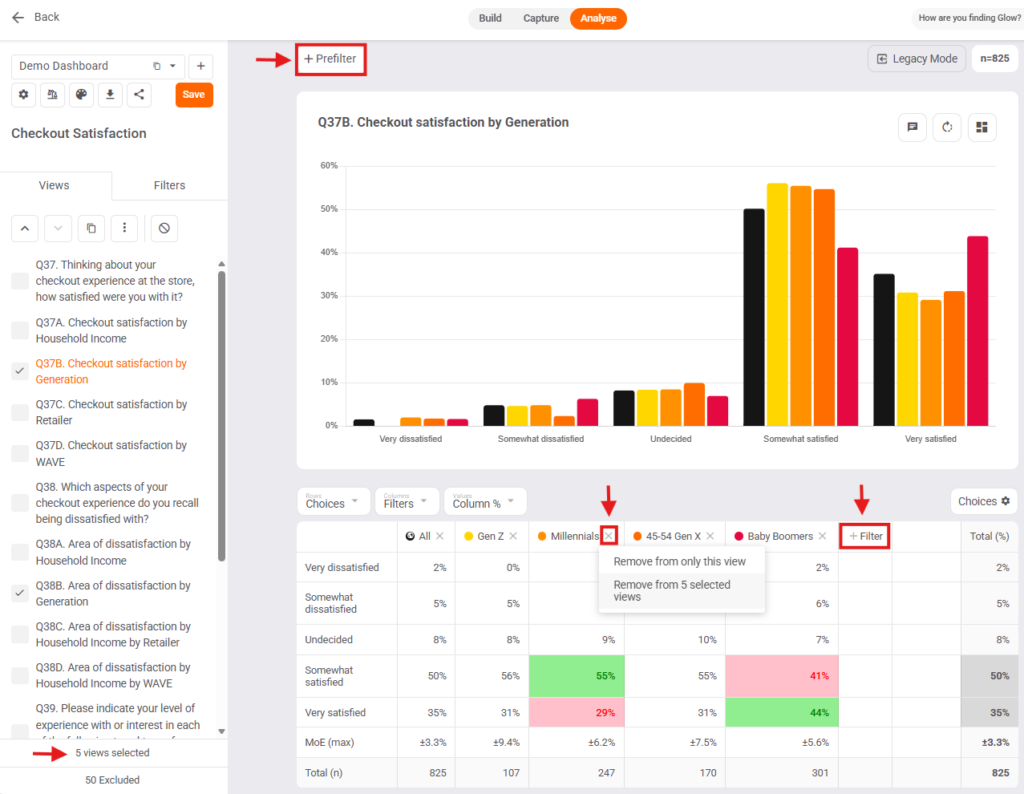
Apply the same local filters across multiple views in one click.
How it works
- Select the views in the “Views” tab
- Click +Filter in your table or +Prefilter above your chart
- Pick filters
- Click “Add to > Selected Views (N)”
Remove filters just as easily, from one view or all selected views.
Why it matters
- Speeds up comparative analysis
- Cuts repetitive setup
- Keeps views consistent
Chart legends
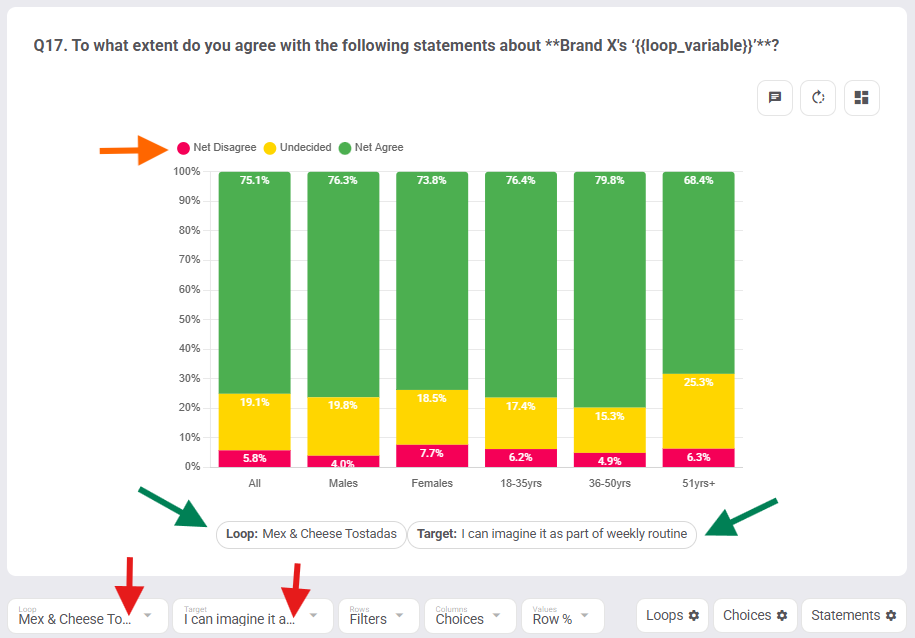
Charts are now easier to interpret and present straight from Glow.
What’s new
- Legends visible aboe your charts
- Click variables to hide them instantly
- Target / Loop displayed for matrix charts underneath your chart
Why it matters
- Cleaner presentations
- Faster interpretation
- More control in stakeholder walkthroughs
Wrapping up
Q1’s updates focus on three things:
- Faster survey creation
- Smarter in-platform support
- Clearer, more controlled reporting
The goal? Less friction, more insight, faster decisions.
Need a walkthrough of these updates? Reach out to the Glow team or book a demo.
We’re shipping new features fast! Keep up to date on all the latest updates in the Glow Changelog

Manny Marasigan
Product Manager at Glow